Sharp: The Fastest Node.js Image Processor
Complete guide to Sharp - the high-performance image processing library for Node.js. Learn resizing, format conversion, optimization, and real-world use cases.
If you’re processing images in Node.js, you’re probably using Sharp. It’s ridiculously fast, simple to use, and handles everything from basic resizing to complex transformations. We use it extensively at imgfast, and it’s hard to imagine building an image service without it.

Sharp: High-performance image processing powered by libvips, built for Node.js
What is Sharp?
Sharp is a Node.js library for image processing. It’s a wrapper around libvips - a low-level image processing library written in C that’s designed for speed and low memory usage.
What makes Sharp special:
- Fast - 4-5× faster than ImageMagick, 10× faster than other Node.js libraries
- Memory efficient - Processes images in streams, doesn’t load entire files into RAM
- Modern formats - WebP, AVIF, JPEG XL support out of the box
- Simple API - Chainable operations that make sense
- Production-ready - Used by Gatsby, Next.js, Netlify, Cloudinary, and thousands of others
What you can do with it:
- Resize images (with smart cropping)
- Convert formats (JPEG, PNG, WebP, AVIF, etc.)
- Optimize file sizes
- Apply effects (blur, sharpen, tint, rotate)
- Extract metadata
- Generate thumbnails
- Create responsive image sets
- Batch process thousands of images
Installation
npm install sharp
# or
yarn add sharp
# or
pnpm add sharp
Sharp compiles native binaries for your platform. Installation takes a bit longer than pure JavaScript libraries, but the performance payoff is huge.
Platform support:
- macOS (Intel and Apple Silicon)
- Linux (x64, ARM)
- Windows
- Docker/containers
- AWS Lambda (with pre-built binaries)
Basic usage
The API is beautifully simple. You chain operations and Sharp executes them efficiently:
const sharp = require('sharp');

// Resize an image
sharp('input.jpg')
  .resize(800, 600)
  .toFile('output.jpg');
That’s it. Input image, resize operation, output file.
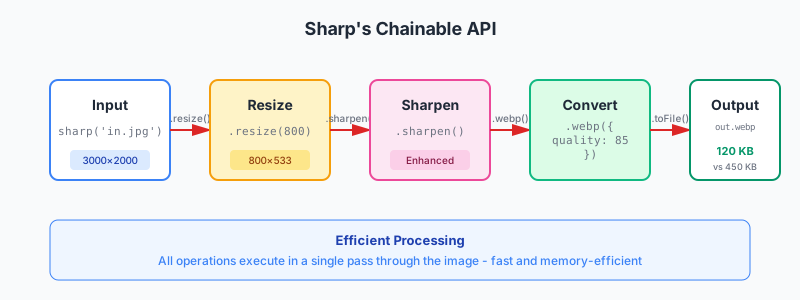
Sharp’s chainable API: operations are queued and executed efficiently in a single pass
Common operations
Resize with options:
sharp('photo.jpg')
  .resize(800, 600, {
    fit: 'cover',      // How to fit: cover, contain, fill, inside, outside
    position: 'center' // Crop position: center, top, bottom, left, right
  })
  .toFile('resized.jpg');
Convert formats:
// JPEG to WebP
sharp('photo.jpg')
  .webp({ quality: 85 })
  .toFile('photo.webp');

// PNG to AVIF
sharp('graphic.png')
  .avif({ quality: 80 })
  .toFile('graphic.avif');
Optimize without changing format:
sharp('large.jpg')
  .jpeg({ quality: 85, progressive: true })
  .toFile('optimized.jpg');
Chain multiple operations:
sharp('input.jpg')
  .resize(1200, 800)
  .sharpen()
  .jpeg({ quality: 85, progressive: true })
  .toFile('output.jpg');
Operations execute in order, efficiently, in a single pass through the image.
Resizing: The most common use case
Sharp’s resizing is where it really shines. Fast, flexible, and smart about how images are cropped.
Fit modes
cover - Fill the dimensions, crop what doesn’t fit (most common):
sharp('photo.jpg')
  .resize(800, 600, { fit: 'cover' })
  .toFile('cropped.jpg');
Result: Exactly 800×600, parts of image may be cropped.
contain - Fit inside dimensions, letterbox if needed:
sharp('photo.jpg')
  .resize(800, 600, { fit: 'contain', background: '#fff' })
  .toFile('letterboxed.jpg');
Result: Entire image visible, may have white bars to fill 800×600.
fill - Stretch to fill dimensions (usually looks bad):
sharp('photo.jpg')
  .resize(800, 600, { fit: 'fill' })
  .toFile('stretched.jpg');
Result: Exactly 800×600, but distorted if aspect ratios don’t match.
inside - Resize to fit inside dimensions, maintain aspect ratio:
sharp('photo.jpg')
  .resize(800, 600, { fit: 'inside' })
  .toFile('resized.jpg');
Result: Maximum 800×600, actual size might be smaller to preserve aspect ratio.
outside - Resize to cover dimensions, maintain aspect ratio:
sharp('photo.jpg')
  .resize(800, 600, { fit: 'outside' })
  .toFile('resized.jpg');
Result: Minimum 800×600, actual size might be larger to preserve aspect ratio.
Smart cropping
Sharp can detect the most interesting part of an image and crop to that:
sharp('photo.jpg')
  .resize(800, 800, {
    fit: 'cover',
    position: sharp.strategy.attention // Focus on most interesting area
  })
  .toFile('smart-crop.jpg');
Other strategies:
sharp.strategy.entropy- Focus on high-detail areassharp.strategy.attention- Focus on salient features (faces, objects)
Resize without upscaling
Prevent images from getting larger than the original:
sharp('small-photo.jpg')
  .resize(2000, 2000, {
    fit: 'inside',
    withoutEnlargement: true // Don't upscale if image is smaller
  })
  .toFile('not-upscaled.jpg');
If small-photo.jpg is 800×600, output will be 800×600, not 2000×1500.
Format conversion
Sharp handles all modern formats and does a great job optimizing them.
JPEG options
sharp('input.png')
  .jpeg({
    quality: 85,           // 1-100
    progressive: true,     // Progressive JPEG
    chromaSubsampling: '4:2:0', // Color subsampling
    mozjpeg: true          // Use mozjpeg for better compression
  })
  .toFile('output.jpg');
WebP options
sharp('input.jpg')
  .webp({
    quality: 85,     // 1-100
    lossless: false, // Lossless compression
    nearLossless: false, // Near-lossless compression
    effort: 4        // 0-6, higher = smaller but slower
  })
  .toFile('output.webp');
AVIF options
sharp('input.jpg')
  .avif({
    quality: 80,  // 1-100
    effort: 4,    // 0-9, higher = smaller but slower
    chromaSubsampling: '4:2:0'
  })
  .toFile('output.avif');
Reality check: AVIF encoding is slow (10-30 seconds for large images at high effort). Generate once, cache forever.
PNG options
sharp('input.jpg')
  .png({
    compressionLevel: 9, // 0-9, higher = smaller but slower
    palette: true,       // Use palette-based (PNG-8) if possible
    quality: 100         // Quality for palette quantization
  })
  .toFile('output.png');
Generating responsive image sets
Here’s where Sharp becomes incredibly useful - generating all the sizes for responsive images:
const sharp = require('sharp');
const fs = require('fs');

const sizes = [400, 800, 1200, 1600, 2400];
const formats = ['jpg', 'webp', 'avif'];

async function generateResponsiveImages(inputPath, outputDir) {
  const image = sharp(inputPath);

  for (const size of sizes) {
    for (const format of formats) {
      let pipeline = image.clone().resize(size);

      const outputPath = `${outputDir}/image-${size}.${format}`;

      switch (format) {
        case 'jpg':
          pipeline = pipeline.jpeg({ quality: 85, progressive: true });
          break;
        case 'webp':
          pipeline = pipeline.webp({ quality: 85 });
          break;
        case 'avif':
          pipeline = pipeline.avif({ quality: 80 });
          break;
      }

      await pipeline.toFile(outputPath);
      console.log(`Generated ${outputPath}`);
    }
  }
}

// Generate all sizes and formats
generateResponsiveImages('hero.jpg', './output');
This generates 15 files (5 sizes × 3 formats) ready for your responsive image setup.
Metadata extraction
Get information about images without processing them:
const metadata = await sharp('photo.jpg').metadata();

console.log(metadata);
// {
//   format: 'jpeg',
//   width: 3000,
//   height: 2000,
//   space: 'srgb',
//   channels: 3,
//   depth: 'uchar',
//   density: 72,
//   hasAlpha: false,
//   orientation: 1,
//   exif: <Buffer ...>,
//   icc: <Buffer ...>
// }
Useful metadata:
width,height- Dimensionsformat- Image formathasAlpha- Transparency supportorientation- EXIF orientation (important for photos)space- Color space (srgb, rgb, etc.)
Performance tips
Process images in parallel
const sharp = require('sharp');

const images = ['img1.jpg', 'img2.jpg', 'img3.jpg'];

// Process all at once
await Promise.all(
  images.map(img =>
    sharp(img)
      .resize(800, 600)
      .webp({ quality: 85 })
      .toFile(img.replace('.jpg', '.webp'))
  )
);
Sharp handles concurrency well. Just don’t spawn thousands simultaneously - your CPU has limits.
Stream processing for large files
const fs = require('fs');

// Stream processing - low memory usage
fs.createReadStream('huge-image.jpg')
  .pipe(sharp().resize(1200))
  .pipe(fs.createWriteStream('resized.jpg'));
Clone for multiple outputs
const pipeline = sharp('input.jpg');

// Clone the pipeline for each output
await pipeline.clone().resize(400).toFile('small.jpg');
await pipeline.clone().resize(800).toFile('medium.jpg');
await pipeline.clone().resize(1200).toFile('large.jpg');
Cloning is efficient - Sharp doesn’t decode the image multiple times.
Cache decoded images
const sharp = require('sharp');

// Cache the decoded image
sharp.cache({ files: 0 }); // Disable file cache (default)
sharp.cache({ items: 100 }); // Cache up to 100 decoded images
Useful when processing the same source image multiple times.
Real-world examples
Example 1: Thumbnail generator
async function generateThumbnail(inputPath, outputPath, size = 300) {
  await sharp(inputPath)
    .resize(size, size, {
      fit: 'cover',
      position: sharp.strategy.attention
    })
    .jpeg({ quality: 80 })
    .toFile(outputPath);
}

await generateThumbnail('photo.jpg', 'thumb.jpg', 300);
Example 2: Watermark images
async function addWatermark(inputPath, watermarkPath, outputPath) {
  const watermark = await sharp(watermarkPath)
    .resize(200)
    .toBuffer();

  await sharp(inputPath)
    .composite([{
      input: watermark,
      gravity: 'southeast' // Bottom-right corner
    }])
    .toFile(outputPath);
}

await addWatermark('photo.jpg', 'logo.png', 'watermarked.jpg');
Example 3: Auto-orient from EXIF
async function autoOrient(inputPath, outputPath) {
  await sharp(inputPath)
    .rotate() // Auto-rotate based on EXIF orientation
    .toFile(outputPath);
}

// Fixes photos taken on phones appearing sideways
await autoOrient('photo.jpg', 'oriented.jpg');
Example 4: Blur sensitive areas
async function blurImage(inputPath, outputPath, sigma = 10) {
  await sharp(inputPath)
    .blur(sigma) // 0.3 - 1000, higher = more blur
    .toFile(outputPath);
}

await blurImage('private-photo.jpg', 'blurred.jpg', 20);
Example 5: Convert everything in a directory
const fs = require('fs').promises;
const path = require('path');

async function convertDirectory(inputDir, outputDir, format = 'webp') {
  const files = await fs.readdir(inputDir);
  const imageFiles = files.filter(f => /\.(jpg|jpeg|png)$/i.test(f));

  await fs.mkdir(outputDir, { recursive: true });

  await Promise.all(
    imageFiles.map(async (file) => {
      const inputPath = path.join(inputDir, file);
      const outputPath = path.join(
        outputDir,
        file.replace(/\.(jpg|jpeg|png)$/i, `.${format}`)
      );

      await sharp(inputPath)
        .toFormat(format, { quality: 85 })
        .toFile(outputPath);

      console.log(`Converted ${file}`);
    })
  );
}

await convertDirectory('./images', './output', 'webp');
Integration with frameworks
Express.js middleware
const express = require('express');
const sharp = require('sharp');

const app = express();

app.get('/images/:filename', async (req, res) => {
  const { filename } = req.params;
  const width = parseInt(req.query.w) || 800;
  const quality = parseInt(req.query.q) || 85;

  try {
    const buffer = await sharp(`./uploads/${filename}`)
      .resize(width)
      .jpeg({ quality })
      .toBuffer();

    res.type('image/jpeg').send(buffer);
  } catch (err) {
    res.status(404).send('Image not found');
  }
});

app.listen(3000);
Usage: http://localhost:3000/images/photo.jpg?w=400&q=80
Next.js API route
// pages/api/images/[...path].js
import sharp from 'sharp';
import path from 'path';
import fs from 'fs';

export default async function handler(req, res) {
  const { path: imagePath, w, q } = req.query;
  const width = parseInt(w) || 800;
  const quality = parseInt(q) || 85;

  const filePath = path.join(process.cwd(), 'public', imagePath.join('/'));

  if (!fs.existsSync(filePath)) {
    return res.status(404).json({ error: 'Not found' });
  }

  const buffer = await sharp(filePath)
    .resize(width)
    .webp({ quality })
    .toBuffer();

  res.setHeader('Content-Type', 'image/webp');
  res.setHeader('Cache-Control', 'public, max-age=31536000, immutable');
  res.send(buffer);
}
Astro (build-time processing)
// scripts/generate-images.js
import sharp from 'sharp';
import { glob } from 'glob';

const images = await glob('src/images/**/*.{jpg,png}');
const sizes = [400, 800, 1200];

for (const img of images) {
  for (const size of sizes) {
    const outputPath = img
      .replace('src/images', 'public/optimized')
      .replace(/\.(jpg|png)$/, `-${size}.webp`);

    await sharp(img)
      .resize(size)
      .webp({ quality: 85 })
      .toFile(outputPath);
  }
}
Run during build: "build": "node scripts/generate-images.js && astro build"
Common gotchas
Gotcha 1: Forgetting await
// ❌ Wrong - returns a promise, doesn't process
sharp('input.jpg')
  .resize(800)
  .toFile('output.jpg');

// ✅ Correct - waits for processing to complete
await sharp('input.jpg')
  .resize(800)
  .toFile('output.jpg');
Gotcha 2: Reusing pipeline
const pipeline = sharp('input.jpg').resize(800);

// ❌ Wrong - pipeline consumed after first use
await pipeline.toFile('output1.jpg');
await pipeline.toFile('output2.jpg'); // Error!

// ✅ Correct - clone for multiple outputs
await pipeline.clone().toFile('output1.jpg');
await pipeline.clone().toFile('output2.jpg');
Gotcha 3: Wrong order of operations
// ❌ Wrong - format conversion before resize (inefficient)
sharp('input.jpg')
  .webp({ quality: 85 })
  .resize(800)
  .toFile('output.webp');

// ✅ Correct - resize first, then convert
sharp('input.jpg')
  .resize(800)
  .webp({ quality: 85 })
  .toFile('output.webp');
Operations execute in order. Resize before converting for better performance.
Gotcha 4: AVIF timeouts
// ❌ May timeout on large images
await sharp('huge-photo.jpg')
  .avif({ quality: 80, effort: 9 })
  .toFile('output.avif');

// ✅ Lower effort or resize first
await sharp('huge-photo.jpg')
  .resize(2400) // Resize first
  .avif({ quality: 80, effort: 4 }) // Lower effort
  .toFile('output.avif');
AVIF at high effort levels can take 30+ seconds. Be patient or use lower effort.
Performance benchmarks
Real-world processing times on a MacBook Pro M1:
Resize 3000×2000 JPEG to 800×600:
- Sharp: 45ms
- ImageMagick: 220ms
- Jimp (JS): 850ms
Convert JPEG to WebP (800×600):
- Sharp: 65ms
- ImageMagick: 180ms
Generate 5 sizes + 3 formats (15 files total):
- Sharp (parallel): 1.2 seconds
- ImageMagick (parallel): 5.8 seconds
Sharp is consistently 4-5× faster, sometimes 10×+ faster than alternatives.
Alternatives to Sharp
ImageMagick - CLI tool, slower but more features (animations, advanced effects)
- Use when: You need features Sharp doesn’t have
- CLI-based, easy to use in scripts
jimp - Pure JavaScript, no compilation needed
- Use when: Can’t compile native binaries (some hosting environments)
- Much slower than Sharp
Squoosh - Browser-based, works with WebAssembly
- Use when: Processing images in the browser
- Good compression, not for server-side batch processing
For 95% of Node.js image processing, Sharp is the right choice.
The bottom line
Sharp is the standard for Node.js image processing. Fast, reliable, actively maintained, and used by major frameworks and services.
When to use Sharp:
- Building responsive image pipelines
- Batch processing images
- On-demand image resizing (CDN-style services)
- Generating thumbnails
- Format conversion at scale
- Any Node.js project that processes images
Quick wins:
- Install Sharp:
npm install sharp - Generate responsive images: See the example above
- Convert to modern formats: JPEG → WebP/AVIF
- Optimize file sizes: Use quality 80-85 for most images
- Batch process: Use
Promise.all()for parallel processing
It’s fast enough to use in production APIs, efficient enough to run in serverless functions, and simple enough to learn in an afternoon.
Related articles:
- Responsive Images Guide - Use Sharp to generate all the sizes
- JPEG Optimization - Sharp’s JPEG options explained
- WebP Format - Converting to WebP with Sharp
- AVIF Format - AVIF encoding tips
Questions? We’re a small team and actually read our emails - reach out if you need help with Sharp.